Loading EA

Lời nói đầu:EA加载帮助
Loading EA
After purchasing an EA, you'll receive a compressed file containing an .ex4 (for MT4) or .ex5 (for MT5) file.
Open MT4/MT5 desktop program, go to “File” - “Open Data Folder”
which includes a catalogue of all the data files of the software.
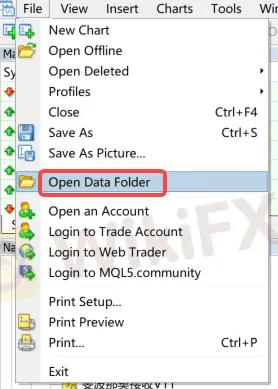
Double-click the 'MQL4/MQL5' file in the catalogue.

Double-click to open Experts directory and paste your downloaded file here


Note: If you have downloaded a indicator (Tool-type EA), you need to place the file in the “Indicators” directory.

Return to MT4/MT5 software navigation bar, click on Expert Advisors - right-click - Refresh to see your newly copied EA program.
Refresh in the “Indicators” section if using indicators.

Configure EA trading project
Open the menu “Tools” - “Options,” - “Expert Advisors” and check the option “Allow DLL imports.”

Open the chart of the instrument you need to load, select the EA you want to run, and in the pop-up window, switch to the “Common” tab and check “Allow live trading” (this is not required for Indicators).

After loading the EA, look at the top right corner of the chart.

If it shows a “sad face”, you need to click the “Auto Trade” button. If it changes to a “smiley face,” it indicates successful loading (this is not required for Indicators).

Broker WikiFX
OANDA
XM
D prime
EBC FINANCIAL GROUP
TMGM
FXCM
OANDA
XM
D prime
EBC FINANCIAL GROUP
TMGM
FXCM
Broker WikiFX
OANDA
XM
D prime
EBC FINANCIAL GROUP
TMGM
FXCM
OANDA
XM
D prime
EBC FINANCIAL GROUP
TMGM
FXCM
Tin hot
Obama đối mặt tội "phản quốc", tin đồn bỏ trốn sang Anh: Sự thật là gì?
WikiFXBản Chất Ký Quỹ Trong Forex Và Cách Kiểm Soát Rủi Ro Cạn Vốn
WikiFXTin tức tổng hợp 20/04/2026: Hormuz lại rung chuyển, dầu thô tăng bùng nổ 7%
WikiFXĐánh giá rủi ro EZINVEST 2026: Sàn có uy tín không hay tiềm ẩn nguy cơ lừa đảo từ loạt khiếu nại rút tiền?
WikiFXĐánh giá sàn Forex TR 2026: Broker này có uy tín không khi dính 197 khiếu nại rủi ro?
WikiFXĐánh giá SIFX 2026: Nhà môi giới offshore này có uy tín không?
WikiFXĐánh giá rủi ro sàn ALPEX TRADING năm 2026: Lỗ hổng pháp lý và hàng loạt khiếu nại bủa vây
WikiFXTại Sao Giấy Phép Giám Sát Lại Là "Dây An Toàn" Khi Giao Dịch Ngoại Hối?
WikiFXNhận diện bẫy tâm lý và rủi ro quản trị vốn khi giao dịch ngoại hối
WikiFXĐánh giá sàn Forex IronFX 2026: Có an toàn không? - WikiFX Review
WikiFXTính tỷ giá hối đoái
